- pythonでゲームを作りたい人
- 迷路ゲームのプログラムが欲しい人
こんにちは.けんゆー(@kenyu0501_)です.
最近のpythonの人気は凄いですよね.この人気はおそらく,プログラムが簡単に記述できるだけではなく,ライブラリも豊富だからだと思います.
使用用途も様々で,人工知能に関するプログラムや数値計算,グラフ作成だけではなく,なんと簡単なゲームも作れちゃいます.
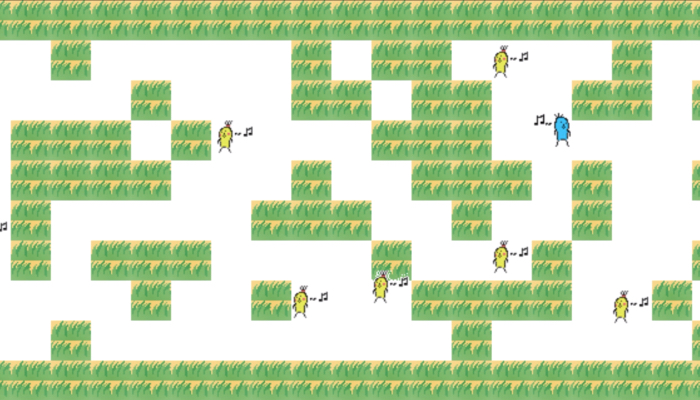
おいらも簡単な2次元ゲームですが,こういった迷路ゲームを作成しました.
興味のある方は是非読んでみてください.
迷路ゲームは日経ソフトウェア2019年3月号を参考にして作りました.
迷路ゲームの概要
ルールなどを含めたゲームの概要をざっくりと説明していきます.
【pythonで迷路ゲームの実装】
・迷路のブロックは乱数にて生成
・自分のライフ(Special ability)は壁抜けと敵キャラの遭遇で減る
・プレイヤの壁抜けは一回につき-1ライフ
・敵キャラは10体,動きは乱数,壁のすりぬけがたまに可能
・ライフ0でゲームオーバ
・ゴールするとリトライと辞めるを選択可 pic.twitter.com/JM0CHrSabP— けんゆー@博士課程 (@kenyu0501_) May 13, 2019
- Pythonのpygameといライブラリを用いて実装
- 敵キャラを回避しつつ,ゴールへ向かうという迷路ゲーム
- 自分のライフ(life)は初め5である.
- 壁抜けでライフが-1.敵キャラとの接触でライフ-0.1.
- 壁抜けをすると壁抜けができる.
- 敵キャラは10体.動きは乱数.壁のすり抜けがたまーにできる.
- 迷路のブロックは乱数により生成
- 十字キーで移動
- 「y」で壁抜け(ライフが余っている状態でしかできない)
このような感じのゲームです.
壁のブロックと敵キャラはプログラム上で増やすことができます.
また,壁を抜けた時や,敵と接触した時のライフの減り具合も同様にプログラム上で調整が可能です.
難しくなく,たまにゴールできないくらいの難易度で設定しました.
プログラムや画像データに関して
こちらから迷路ゲームのダウンロードが可能です.
pythonプログラムと画像データが入っています.
zipファイル→ meiro2
もし,試してみたい方がおりましたらどうぞ.
アプリにしてゲーム配布ができたら良いですが,,,,今の所できてません.
もしできるようになったらパッケージにします.
プログラムについて
zipファイルが落とせない人用にプログラムも記述しておきます.
コメントアウトで機能を書いているので,細かい説明は省きます.
# -*- coding: utf-8 -*-
# maze test
import time

import numpy as np
import pygame

WIDTH = 640
HEIGHT = 480  # 480

WHITE = (255, 255, 255)
GREEN = (0, 255, 0)
BLUE = (0, 0, 255)
BLACK = (0, 0, 0)
LOAD = (255, 255, 255)
NAVY = (0, 0, 128)

#pygame初期化
pygame.init()
#画面オブジェクトの作成
screen = pygame.display.set_mode((WIDTH, HEIGHT))

font1 = pygame.font.Font(None, 48)
font2 = pygame.font.Font(None, 20)
myclock = pygame.time.Clock()

bgx = 0  #BG offset
bgy = 0  #BG offset
size = 32  #sprite size


# sprite class
class Spclass(pygame.sprite.Sprite):
    # スプライトの初期化関数
    def __init__(self, x, y, filename):
        pygame.sprite.Sprite.__init__(self)
        # 画像の読み込み
        self.image = \
            pygame.image.load(filename).convert()
        colorkey = self.image.get_at((0, 0))
        # 透明色を設定する
        self.image.set_colorkey(colorkey)
        self.x = x
        self.y = y
        self.dir = 0
        self.walking = 0
        self.rect = self.image.get_rect()

#プレイヤーのlife(Special Quality)
life = 5.0
#壁抜け時の吹き出し用操作変数m
hukidashi = 0
# プレイヤー
class Player(Spclass):
    # スプライトの移動処理を行う関数
    def update(self):
        global bgx, bgy, life, hukidashi, endflag

        x1 = [0, 1, 0, -1]
        y1 = [-1, 0, 1, 0]
        if self.walking == 0:
            newdir = -1
            #キーボード入力の判定を行う
            press = pygame.key.get_pressed()
            press2 = pygame.key.get_pressed()
            if press[pygame.K_UP]: newdir = 0
            if press[pygame.K_RIGHT]: newdir = 1
            if press[pygame.K_DOWN]: newdir = 2
            if press[pygame.K_LEFT]: newdir = 3
            #hが押された時に発動するコマンド
            if press[pygame.K_h]:
                pygame.draw.rect(screen, (125, 125, 0), pygame.Rect(270, 195, 150, 45))
                question_1 = \
                    font1.render("Do you use your special ability?", True, WHITE)
                screen.blit(question_1, (50, 150))
                answer_1 = \
                    font1.render("y : YES", True, WHITE)
                screen.blit(answer_1, (280, 200))
                answer_2 = \
                    font1.render("n :  No ", True, WHITE)
                screen.blit(answer_2, (280, 250))

            if newdir != -1:
                hukidashi = 0
                newx = int(self.x / size) + x1[newdir]
                newy = int(self.y / size) + y1[newdir]
                if bgdata[newy][newx] == "0":
                    self.dir = newdir
                    self.walking = 1
                else:
                    if (bgdata[newy][newx] == "1") & (life > 0):
                        if press2[pygame.K_y]:
                            #                            pygame.draw.rect(screen, (125,125,0), pygame.Rect(270,195,150,45), 2)

                            self.dir = newdir
                            self.walking = 1
                            life -= 1.0
                            hukidashi = 1
        #                        elif press2[pygame.K_n]:
        ##                            pygame.draw.rect(screen, (125,125,0), pygame.Rect(270,245,150,45), 2)

        else:
            self.x += x1[self.dir] * 4
            self.y += y1[self.dir] * 4
            if hukidashi != 0:
                commentimage = pygame.image.load("comment1.png").convert()
                rect_cmimage = commentimage.get_rect().move(self.x, self.y)
                #                cmimage.fill(LOAD)
                screen.blit(commentimage, rect_cmimage)

            if (self.x % size) == 0 and (self.y % size) == 0:
                self.walking = 0

        # 画面のスクロール処理
        if self.x - bgx < 160: bgx -= 4
        if self.x - bgx >= WIDTH - 160: bgx += 4
        if self.y - bgy < 160: bgy -= 4
        if self.y - bgy >= HEIGHT - 160: bgy += 4
        self.rect.left = self.x - bgx
        self.rect.top = self.y - bgy
        # どのクラスとぶつかっているかの衝突判定
        hitlist = pygame.sprite.spritecollide(self, allgroup, False)
        #hitlist.pop(0)
        if len(hitlist) >= 2:
            for hit in hitlist:
                if hit == player:
                    continue
                elif hit == goal:
                    imagetext1 = font1.render("GOAL!", True, GREEN)
                    screen.blit(imagetext1, (260, 150))
                    btn1image = pygame.image.load("retry1.png").convert()
                    rect_btn1image = btn1image.get_rect().move(180, 200)
                    screen.blit(btn1image, rect_btn1image)
                    imagetext2 = font1.render("or", True, GREEN)
                    screen.blit(imagetext2, (300, 215))
                    btn2image = pygame.image.load("quit1.png").convert()
                    rect_btn2image = btn2image.get_rect().move(350, 200)
                    screen.blit(btn2image, rect_btn2image)
                    life = 0.0

                    if event.type == pygame.MOUSEBUTTONDOWN and event.button == 1:
                        mouse_x, mouse_y = event.pos
                        if mouse_x >= 180 and mouse_x <= 285 and mouse_y >= 200 and mouse_y <= 250:
                            #                            for i in range(5):
                            btn1image_2 = pygame.image.load("retry2.png").convert()
                            rect_btn1image_2 = btn1image_2.get_rect().move(180, 200)
                            screen.blit(btn1image_2, rect_btn1image_2)
                            time.sleep(0.02)
                            self.y = size
                            self.x = size
                            life = 5
                            bgx = -128
                            bgy = -128
                        #                            break
                        elif mouse_x >= 350 and mouse_x <= 455 and mouse_y >= 200 and mouse_y <= 250:
                            btn2image = pygame.image.load("quit1.png").convert()
                            rect_btn2image = btn2image.get_rect().move(350, 200)
                            endflag = 1
                            print("end")
                #                            break

                elif hit == enemys[0] or hit == enemys[1] or hit == enemys[2] or hit == enemys[3] or hit == enemys[
                    4] or hit == enemys[5] or hit == enemys[6] or hit == enemys[7] or hit == enemys[8] or hit == enemys[
                    9]:
                    life -= 0.01
        question_1 = font2.render("Life : {0:.2f}".format(life), True, WHITE)
        screen.blit(question_1, (500, 20))


#敵キャラのクラス
class Enemy(Spclass):
    # スプライトの移動処理を行う関数
    def update(self):
        global bgx, bgy
        x2 = [0, 1, 0, -1]
        y2 = [-1, 0, 1, 0]
        if self.walking == 0:
            newdir = -1
            p = np.random.randint(1, 101)
            if p % 4 == 0: newdir = 0
            if p % 4 == 1: newdir = 1
            if p % 4 == 2: newdir = 2
            if p % 4 == 3: newdir = 3
            if newdir != -1:
                newx = int(self.x / size) + x2[newdir]
                newy = int(self.y / size) + y2[newdir]
                if bgdata[newy][newx] == "0":
                    self.dir = newdir
                    self.walking = 1
                #ブロックに当たった場合,壁抜けができるかどうかをか確率的にする
                elif (bgdata[newy][newx] == "1") & (np.random.randint(1, 101) % 5 == 0):
                    self.dir = newdir
                    self.walking = 1
                else:
                    self.walking = 0
        else:
            self.x += x2[self.dir] * 4
            self.y += y2[self.dir] * 4
            if (self.x % size) == 0 and (self.y % size) == 0:
                self.walking = 0

        self.rect.left = self.x - bgx
        self.rect.top = self.y - bgy


#ゴール(終わり)のクラス
class Goal(Spclass):
    def update(self):
        global bgx, bgy
        self.rect.left = self.x - bgx
        self.rect.top = self.y - bgy


#迷路を作る関数
def func(l):
    # 配列かどうかの判定
    if isinstance(l, (np.ndarray, list)):
        return [func(i) for i in l]
    else:
        #80以下ならブロックを置かない
        if l < 70:
            return 0
        else:
            return 1

def functor(f, l):
    #配列かどうかの判定
    if isinstance(l, (np.ndarray, list)):
        return [functor(f, i) for i in l]
    else:
        return f(l)


def join_n(l):
    #配列の次元数を取得
    if np.ndim(l) != 1:
        return [join_n(i) for i in l]
    else:
        return ''.join(l)

#迷路のブロックは乱数(0-100)により生成する.8行38列.
int_list = np.random.randint(0, 100, (8, 38))

int_list = func(int_list)
# print(len(int_list))
int_list[0][0] = 0
int_list[7][37] = 0
# print(int_list)

#周囲の壁は2にする
array = np.array([[2, 2, 2, 2, 2, 2, 2, 2]])

int_list = np.hstack([array.T, int_list, array.T])
str_list = functor(str, int_list)
bgdata_m = join_n(str_list)

bgdata_add = np.array(["2222222222222222222222222222222222222222"])

bgdata = np.append(bgdata_add, bgdata_m)
bgdata = np.append(bgdata, bgdata_add)

blockimage = \
    pygame.image.load("grass.png").convert()
bgimage = pygame.Surface((size * 40, size * 10))  # ここの数字でブロックの迷路の長さを変更できる
bgimage.fill(LOAD)

# 迷路を描画する
for y in range(10):
    for x in range(40):
        if (bgdata[y][x] == "0"): continue
        bgimage.blit(blockimage, (size * x, size * y))

# スプライト100個をグループに登録する
allgroup = pygame.sprite.Group()

goal = Goal(size * 38, size * 8, "ken_gf.png")
allgroup.add(goal)
player = Player(size * 1, size * 1, "ken.png")
enemys = [i for i in range(10)]
for i in range(10):
    enemys[i] = Enemy(size * ((i + 1) * 2), size * (i * 0.5), "ken_cg.png")
    allgroup.add(enemys[i])

allgroup.add(player)
endflag = 0

#メインループ
while endflag == 0:
    for event in pygame.event.get():
        if event.type == pygame.QUIT: endflag = 1  # ウィンドウを閉じた時の処理

    screen.fill(BLACK)
    # 迷路の表示
    screen.blit(bgimage, (-bgx, -bgy))
    # スプライトの移動処理
    allgroup.update()
    #    time.sleep(0.001)
    # スプライトの描画処理
    allgroup.draw(screen)
    myclock.tick(45)  # ループの周期を1/45秒に設定
    pygame.display.flip()  # 画面を更新する

pygame.quit()
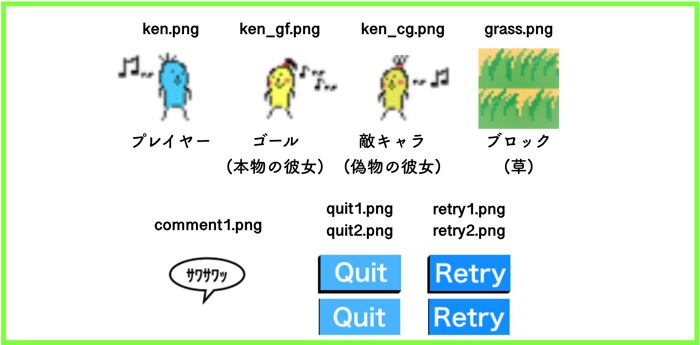
画像素材たち
欲しかったら使ってください.
この記事を読んでくれた人にオススメの記事です.
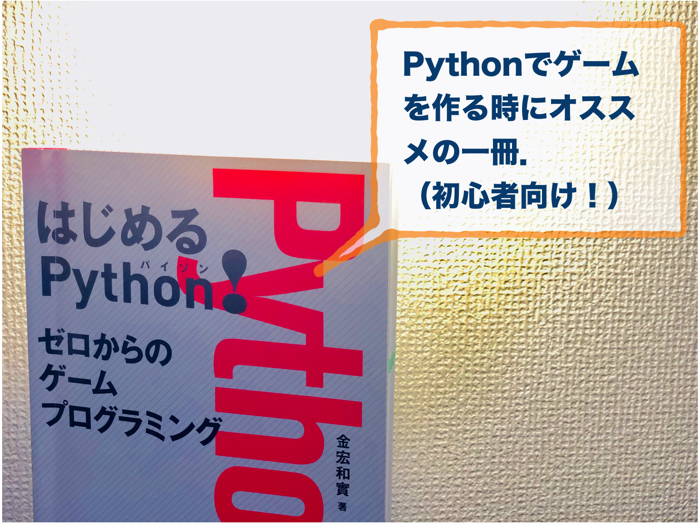
この本はこんな人にオススメです Pythonでゲームを作ってみたい人 Pygameを理解したい人 Python…