- モデルのパラメータ推定をしている人
- 理系大学生の人(アニメーションは資料作成等にお役立てください)
- 数学や工学が好きな人
こんにちは.けんゆーです(@kenyu0501_)
Twitterの方でも発信しましたが,以下.
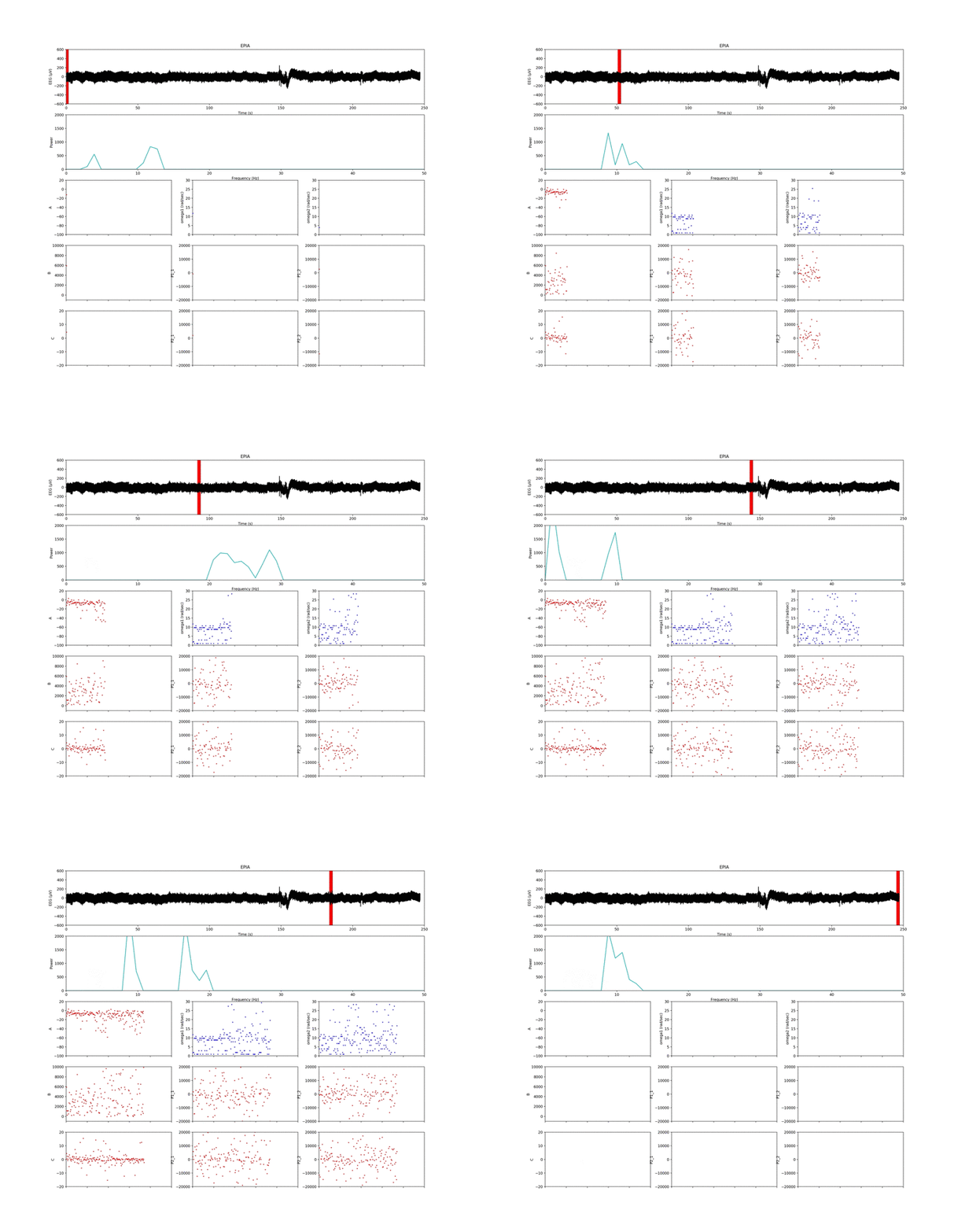
時系列データ(上図)の処理で、
・時間周波数解析(上から二番目)
・各窓(時系列の赤い線)のピークを2つ取得
・窓毎に最小二乗法でパラメータ推定を行うプログラムと、アニメーション出力を出来るものを組みました( ^ω^ )
モデルの数式は変えれば何でも対応します。
公開しますので、しばしお待ちを pic.twitter.com/Z0FKINL2Sx— けんゆー@博士課程 (@kenyu0501_) December 26, 2018
時系列データの解析で良く行われる「時間周波数解析」と,「その解析窓の内側で最小二乗法を使ったモデルパラメータ推定」のプログラミングを公開しようと思います.
時系列データの解析をリアルタイムで行えるようにするためアニメーションを作っています.
(アニメーションというか最終的に解析したデータの表示を考えたいところですが,,,)
時間周波数解析は,生体信号を解析する上でも基本的なものなので知っていて損はないと思います.
周波数が高くなれば緊張とか,低くなれば安静とか,そういった定性的な指標を獲得するためにも大事なツールの一つです.
(参考:「時間周波数分析とは!?」)
さらに,最小二乗法は計算コストが低い上に,データの傾向を把握するモデルのパラメタを決定するアルゴリズムでして,こいつも同時に使えたらデータ解析が面白くなると思います.(ほとんどの工学系では,一次直線近似とかで習うと思います)
解析のアニメーション動画について
改良を重ねて,アニメーションももっと見やすい形に随時変更中ですが,出し惜しみはするものではないと思うのでその都度UPしていきます.
以下では,このアニメーションの説明をしておきます.
(ブログに載せているため,GIFにしてますが,プログラムを回すとmp4出力です.)
一番上の図は生体信号(脳波)の生波形です.
フィルタリング処理など,何も施していない時間的なデータです.
この時系列データに対して,解析するための窓(赤い線)を設定します.
窓幅は1秒間(512 sampling点数)です.
もちろん,自分のデータの解析したい時間に調整することが可能です.
この解析する窓は,ランニングウインドウとか,スライディングウインドウと呼ばれます.
窓内での解析処理を終えると,1秒分横に移動して,さらに次の解析を行います.
このウインドウごとに高速フーリエ変換を行います.
このプログラムでは,ランニングウインドウごとに支配的な周波数を二つ選びます.
(対象が脳波なので,0.5 ~ 30.0 Hz の間にしてます.)
ちなみにモデルはこれです.

アニメーションが上手く動くかどうか試しただけなので,自分で好きな数式を入れたら良いと思います.
選んだ二つのピーク(ω1とω2)を,3×3で表示した9つのグラフのうち,青のプロットで示してます.
モデル右辺のωに入れて,残りは推定します.
あっ,ωは周波数ピーク値に2πをかけてます.
残りのパラメータ(A, B, C, P1_1, P2_1, P2_1, P2_2)は,最小二乗法によってパラメータ同定を行なってます.
赤で示したプロットです.
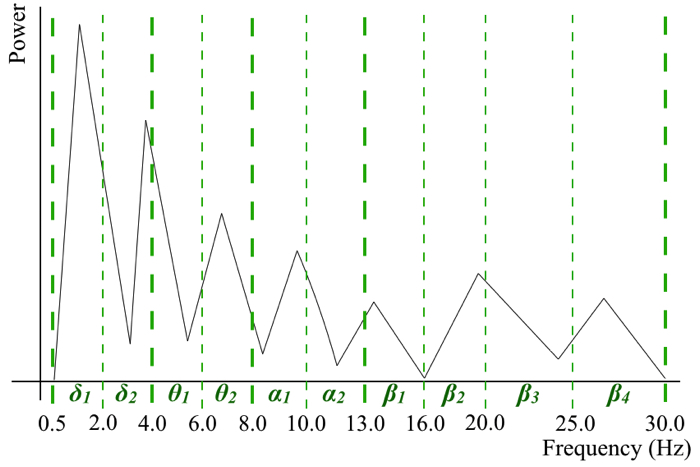
ここで,生波形は使わずに,ピークを含んだ以下の周波数帯域の情報を用いたIFFTの波形によってパラメタを決めてます.
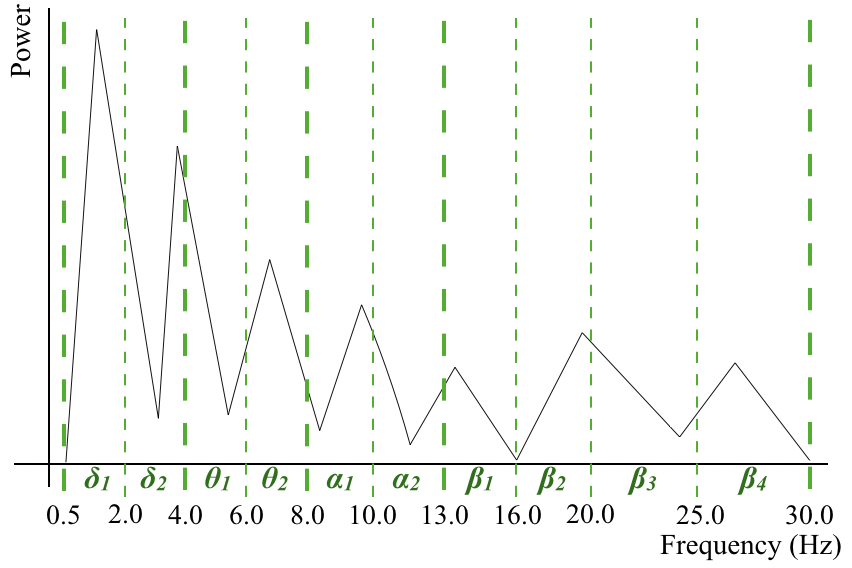
10個に帯域を分けてます.
今回のパラメタ推定の詳しい狙いなどは,以下の奮闘記に書いています.
「最小二乗法によるパラメータ同定奮闘記2」
Pythonプログラムについて
こちらがプログラムになります.
公開してますが,他のユーザが使用するのを意識してないので雑です.
素人が組んだプログラムなので素人には読めると思います(笑)
(できないよりは回れば良いと思っている派なので勘弁ください,,,)
クラスとかそういうオブジェクト指向たっぷりの組み方もいつか勉強しておきます.
# -*- coding: utf-8 -*-
import csv
import scipy.signal as sps
from scipy.optimize import leastsq
import numpy as np
import matplotlib.pyplot as plt

import matplotlib.animation as animation
import matplotlib.patches as patches
from time import sleep
frame = 241

#定数宣言
N = 512            # サンプル数
dt = 0.002          # サンプリング間隔
p_max = 30.0
p_min = 0.5
#p_band = 1.00000
delta_bound, theta_min, theta_bound, alpha_min, alpha_bound, beta_min, beta_bound1, beta_bound2, beta_bound3 = 2.0, 4.0, 6.0, 8.0, 10.0, 13.0, 16.0, 20.0, 25.0
#ファイル名宣言
inputData = 'exp.txt'
outputPara = 'parameters_b_100mass.txt'
outputIFFT = 'ifft_b_100mass.txt'
outputMovie = 'result_b.mp4'
rowN = 2

#配列用意
x_exp = list()
x_ifft = np.empty((2,0))
t = list()
xd = list()
xdd = list()
w = list()
p = list()
x_ifft_s = list()
x_exp_s = list()
t_s = list()
Result = list()
F2 = list()
freq = list()

timecount = 1 #global
#const.
t_max = 250
t_min = 0
window = N*dt
timestep = 0 #timestep

def det_band(frequencies):
    global p_min, p_max, delta_bound, theta_min, theta_bound, alpha_min, alpha_bound, beta_min, beta_bound1, beta_bound2, beta_bound3
    f_max = list()
    f_min = list()
    k = 0
    for frequency in frequencies:
        if((p_min <= frequency)&(frequency < delta_bound)):
            f_min.append(p_min)
            f_max.append(delta_bound)
        elif((delta_bound <= frequency)&(frequency < theta_min)):
            f_min.append(delta_bound)
            f_max.append(theta_min)
        elif((theta_min <= frequency)&(frequency < theta_bound)):
            f_min.append(theta_min)
            f_max.append(theta_bound)
        elif((theta_bound <= frequency)&(frequency < alpha_min)):
            f_min.append(theta_bound)
            f_max.append(alpha_min)
        elif((alpha_min <= frequency)&(frequency < alpha_bound)):
            f_min.append(alpha_min)
            f_max.append(alpha_bound)
        elif((alpha_bound <= frequency)&(frequency < beta_min)):
            f_min.append(alpha_bound)
            f_max.append(beta_min)
        elif((beta_min <= frequency)&(frequency < beta_bound1)):
            f_min.append(beta_min)
            f_max.append(beta_bound1)
        elif((beta_bound1 <= frequency)&(frequency < beta_bound2)):
            f_min.append(beta_bound1)
            f_max.append(beta_bound2)
        elif((beta_bound2 <= frequency)&(frequency < beta_bound3)):
            f_min.append(beta_bound2)
            f_max.append(beta_bound3)
        elif((beta_bound3 <= frequency)&(frequency <= p_max)):
            f_min.append(beta_bound3)
            f_max.append(p_max)

    f_mix = zip(f_min, f_max)
    f_mix = sorted(f_mix)
    f_min, f_max =zip(*f_mix)

    return f_max, f_min

#fft_peak検出用関数
def fft_peak():
    global t_s, x_exp_s, x_ifft_s, x_ifft, w, p, F2, freq
    peak_idx = list()
    # データのパラメータ
    freq = np.linspace(0, 1.0/dt, N) # 周波数軸
    # 高速フーリエ変換
    F = np.fft.fft(x_exp_s)

    Power = F.copy()
    # 振幅スペクトルを計算
    Power = np.abs(Power)
    # 振幅を元の信号のスケールに揃える
    Power = Power / (N/2) # 交流成分はデータ数で割って2倍する
    Power[0] = Power[0] / 2 # 直流成分
    F2 = F.copy()

    # FFTデータからピークを自動検出
    peak_idx = sps.argrelmax(Power, order=1)[0] # ピーク(極大値)のインデックス取得
    # ピーク検出感度調整もどき、後半側(ナイキスト超)と閾値より小さい振幅ピークを除外
    peak_cut = 0.1 # ピーク閾値
    peak_idx = peak_idx[(Power[peak_idx] > peak_cut) & (peak_idx >= p_min) & (peak_idx <= p_max)]
    selected_peakPower = zip(Power[peak_idx], freq[peak_idx])
    peak = sorted(selected_peakPower, reverse=True)
    p, f = zip(*peak)
    p = list(p)
    f =list(f)
    del f[2:]
#    print(f)
#    del p[2:]
#    print(p)

    p_max2, p_min2 = det_band(f)
    if p_min2[0] == p_min2[1]:
        #ローパスフィルタ&&ハイパスフィルタ
        F2[(freq > p_max2[0])|(freq < p_min2[0])] = 0.0
    elif p_min2[1] == p_max2[0]:
        #パスフィルタ
        F2[(freq > p_max2[1])|(freq < p_min2[0])] = 0.0
    else:
        #パスフィルタ
        F2[(freq > p_max2[1]) | ((freq > p_max2[0])&(freq < p_min2[1])) |(freq < p_min2[0])] = 0.0

    #    p_max2 = f[0] + p_band
    #    p_min2 = f[0] - p_band
    #    del p[2:]
    #    w = 2.0 * np.pi * f
    w =  f
    w = [i*2.0*np.pi for i in w]

    #逆高速フーリエ変換
    x_ifft_s = np.fft.ifft(F2)
    #実数部を取得し、振幅を元のスケールに戻す
    x_ifft_s = np.real(x_ifft_s)*2
    x_ifft_s = np.array(x_ifft_s)
    t_s = np.array(t_s)
    x_ifft_m = np.array([t_s, x_ifft_s])
    x_ifft = np.c_[x_ifft, x_ifft_m]

    # 振幅スペクトルを計算
    F2 = np.abs(F2)
#    # 振幅を元の信号のスケールに揃える
#    F2 = F2 / (N/2) # 交流成分はデータ数で割って2倍する
#    F2[0] = F2[0] / 2 # 直流成分


#xd と xddの計算
def cal():
    global t_s, x_ifft_s
    j = 0
    xd.append(float((x_ifft_s[j+1] - x_ifft_s[j])/dt)) #xd[0]
    j+=1
    for j in range(N-1):
        xd.append(float((x_ifft_s[j+1] - x_ifft_s[j])/dt))#xd[1]
        xdd.append(float((xd[j] - xd[j-1])/dt))#xdd[0]
    t_s = t_s.tolist()
    x_ifft_s = x_ifft_s.tolist()
    t_s.pop()
    x_ifft_s.pop()
    xd.pop()

def func3(param, t_s, x_ifft_s, xd, xdd):
    global w
    residual = xdd + (param[0]*xd + param[1]*x_ifft_s + param[2]*x_ifft_s*x_ifft_s*x_ifft_s - param[3]*np.cos(w[0]*t_s)- param[4]*np.sin(w[0]*t_s) - param[5]*np.cos(w[1]*t_s)- param[6]*np.sin(w[1]*t_s))
    return residual

def lsm():
    global t_s, x_ifft_s, xd, xdd
    para = [0., 0., 0., 0., 0., 0., 0.]
    #para = [0, 0, 0, 0]
    t_s = np.array(t_s)
    x_ifft_s = np.array(x_ifft_s)
    xd = np.array(xd)
    xdd = np.array(xdd)
    params = leastsq(func3, para, args=(t_s, x_ifft_s, xd, xdd))
    return params


#main関数
def input_Data():
    global x_exp, t, rowN
    with open(inputData, 'r') as InputFile:
        reader = csv.reader(InputFile, delimiter='\t')
        for row in reader:
            t.append(float(row[0]))
            x_exp.append(float(row[rowN]))
#    print(x_exp)
#    print(t)
#    print(len(x_exp))
#    print(len(t))
def main(TimeStep):
    global x_exp, x_ifft, t, w, p, x_ifft_s, x_exp_s, t_s, xd, xdd, Result
    i = 0
#    for i in range(int(len(x_exp)/N)):
    xd = list()
    xdd = list()
#    for i in range(len(x_exp)/N):
    x_exp_s = x_exp[TimeStep*N:(TimeStep+1)*N]
    t_s = t[TimeStep*N:(TimeStep+1)*N]
#        print(i*N)
    fft_peak()
#    print(w)

    cal()

    Result = lsm()
    OutputFile1.write("{:.3f}\t{:.6f}\t{:.6f}\t{:.6f}\t{:.6f}\t{:.6f}\t{:.6f}\t{:.6f}\t{:.6f}\t{:.6f}\n".format(0.510+TimeStep*dt*N,Result[0][0],Result[0][1],Result[0][2],Result[0][3],Result[0][4],w[0],Result[0][5],Result[0][6],w[1]))
    print("xdd + {:.6f}xd + {:.6f}x + {:.6f}x*x*x - {:.6f}cos{:.6f}t - {:.6f}sin{:.6f}t - {:.6f}cos{:.6f}t - {:.6f}sin{:.6f}t\n".format(Result[0][0],Result[0][1],Result[0][2],Result[0][3],w[0],Result[0][4],w[0],Result[0][5],w[1],Result[0][6],w[1]))
    return Result


#グラフの用意
fig = plt.figure(figsize=(18,16))
ax1 = plt.subplot2grid((5,3), (0,0), colspan=3)
ax2 = plt.subplot2grid((5,3), (1,0), colspan=3)
ax3 = plt.subplot2grid((5,3), (2,0))
ax4 = plt.subplot2grid((5,3), (3,0), sharex = ax3)
ax5 = plt.subplot2grid((5,3), (4,0), sharex = ax3)
ax6 = plt.subplot2grid((5,3), (2,1))
ax7 = plt.subplot2grid((5,3), (3,1), sharex = ax6)
ax8 = plt.subplot2grid((5,3), (4,1), sharex = ax6)
ax9 = plt.subplot2grid((5,3), (2,2))
ax10 = plt.subplot2grid((5,3), (3,2), sharex = ax9)
ax11 = plt.subplot2grid((5,3), (4,2), sharex = ax9)
#fig.tight_layout()
#グラフの初期化
def update_fig():
    ax3.cla()
    ax4.cla()
    ax5.cla()
    ax6.cla()
    ax7.cla()
    ax8.cla()
    ax9.cla()
    ax10.cla()
    ax11.cla()

    ax3.set_ylabel('A')
    ax3.set_ylim(-100, 20)
    ax3.set_xlim(t_min, t_max)

    ax4.set_ylabel('B')
    ax4.set_ylim(-1000, 10000)
    ax5.set_ylabel('C')
    ax5.set_ylim(-20, 20)

    ax6.set_ylabel('omega1 (rad/sec)')
    ax6.set_ylim(0, 30)
    ax6.set_xlim(t_min, t_max)
    ax7.set_ylabel('P1_1')
    ax7.set_ylim(-20000, 20000)
    ax8.set_ylabel('P2_1')
    ax8.set_ylim(-20000, 20000)

    ax9.set_ylabel('omega2 (rad/sec)')
    ax9.set_ylim(0, 30)
    ax9.set_xlim(t_min, t_max)
    ax10.set_ylabel('P1_2')
    ax10.set_ylim(-20000, 20000)
    ax11.set_ylabel('P2_2')
    ax11.set_ylim(-20000, 20000)

def update_fig1():
    ax1.cla()
    ax1.set_title('EPIA')
    ax1.set_xlim(t_min, t_max)
    ax1.set_ylabel('EEG (μV)')
    ax1.set_ylim([-600,600])
    ax1.set_xlabel('Time (s)')
    ax1.plot(t, x_exp, 'k') #時間配列, 実験値配列, 色

def update_fig2():
    global t, F2
    ax2.cla()
    ax2.set_ylabel('Power')
    ax2.set_xlim(0, 50)
    ax2.set_ylim(0,2000)
    ax2.set_xlabel('Frequency (Hz)')
    ax2.plot(freq, F2, 'c')
#    ax2.plot(freq_exp, fft_exp, 'c')

input_Data()
OutputFile1 = open(outputPara, mode='w')

update_fig1()
update_fig2()
update_fig()

def update(timestep):
    global timecount, x_ifft

    result = main(timestep)

    #描画
    #グラフタイトルセット
    update_fig1()
    #データプロット
    r = patches.Rectangle(xy=((timestep-1/2)*window, -600.0), width=window*2, height=1200.0, ec='r', fc='r')
    ax1.add_patch(r)
    update_fig2()

    ax3.plot(timestep*window+window/2, result[0][0], 'r', marker="x", markersize=2)
    ax3.tick_params(labelbottom="off")

    ax4.plot(timestep*window+window/2, result[0][1], 'r', marker="x", markersize=2)
    ax4.tick_params(labelbottom="off")

    ax5.plot(timestep*window+window/2, result[0][2], 'r', marker="x", markersize=2)
    ax5.tick_params(labelbottom="off")


    ax6.plot(timestep*window+window/2, w[0]/(2.0*np.pi), 'b', marker="x", markersize=2)
    ax6.tick_params(labelbottom="off")

    ax7.plot(timestep*window+window/2, result[0][3], 'r', marker="x", markersize=2)
#    ax6.bar(timestep*window+window/2, result[0][3], ec='r')
#    ax6.bar(timestep*window+window/2, result[0][4], ec='b', bottom=result[0][3])
    ax7.tick_params(labelbottom="off")

    ax8.plot(timestep*window+window/2, result[0][4], 'r', marker="x", markersize=2)
    ax8.tick_params(labelbottom="off")

    ax9.plot(timestep*window+window/2, w[1]/(2.0*np.pi), 'b', marker="x", markersize=2)
    ax9.tick_params(labelbottom="off")

    ax10.plot(timestep*window+window/2, result[0][5], 'r', marker="x", markersize=2)
    ax10.tick_params(labelbottom="off")

    ax11.plot(timestep*window+window/2, result[0][6], 'r', marker="x", markersize=2)
    ax11.tick_params(labelbottom="off")


    if timestep+1==frame:
        update_fig()

ani = animation.FuncAnimation(fig, update, interval=50,
                              frames=frame)
ani.save(outputMovie) #保存
#plt.show()

OutputFile1.close()
OutputFile2 = open(outputIFFT, mode='w')
writer = csv.writer(OutputFile2, lineterminator='\n', delimiter='\t')
x_ifft = x_ifft.T
writer.writerows(x_ifft)
OutputFile2.close()
やりたいことが無くなって時間が余ったら見やすいコードに修正します.
アニメーションの意義
理系大学生ならば,発表資料等で,「解析方法」や「実験結果」を説明すると思います.
やはりその時には,動きのある資料の方が良かったりする場合が多いと思います.
価値の高い素敵な発表も,難しすぎて聴衆に理解されないままだと悔しいので,出来る限り納得させる工夫ができたら良いですね.
ブログに公開するのを了承してくださる方で,そういったご相談があれば,一緒に考えますよ〜!
Twitterの方にDM下さい.
では〜!


ダイナミクスの減衰パラメータ”A”が負値(負減衰?)になっている場合があるように見受けられますが,
同定されたパラメータで,生波形と同じ初期値を与えた場合,有限の振幅の波形になるのでしょうか?
宜しくお願いします.