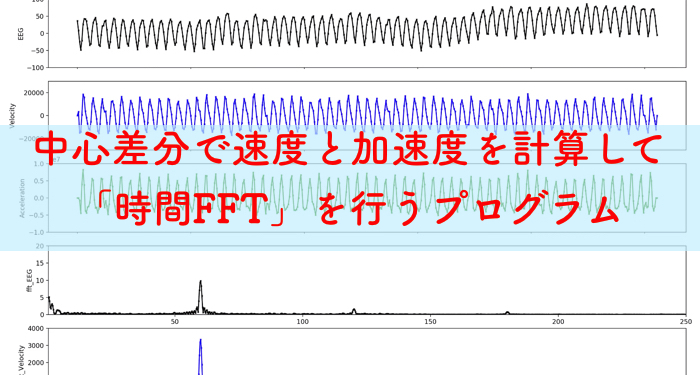
脳波解析などの時系列波形ではよく,時間周波数解析がされるのですが,今回は脳波の電位の周波数解析だけではなく,その速度と加速度を算出し時間FFTを同時に行うプログラムの公開をしておきます.
脳波でなくても,時系列信号の周波数特性を知りたい時には有効です.
(研究で用いるプログラムのアーカイブです)
基本的に,金曜日は研究のアーカイブ記事を書くぞ!!
どのようなインプット-アウトプットか
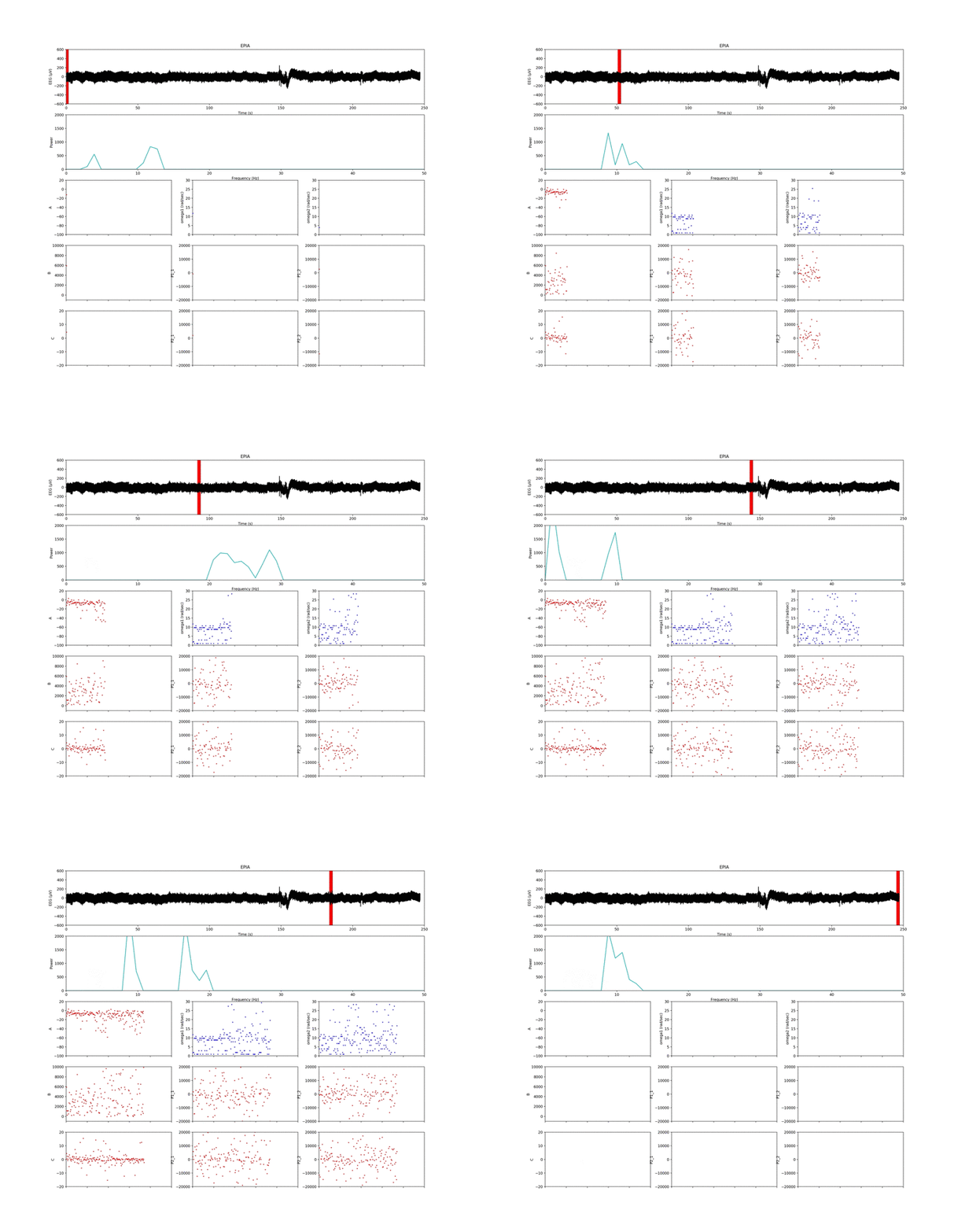
以下のアニメーションは,プログラムを回した時に作成されるインプットーアウトプットです.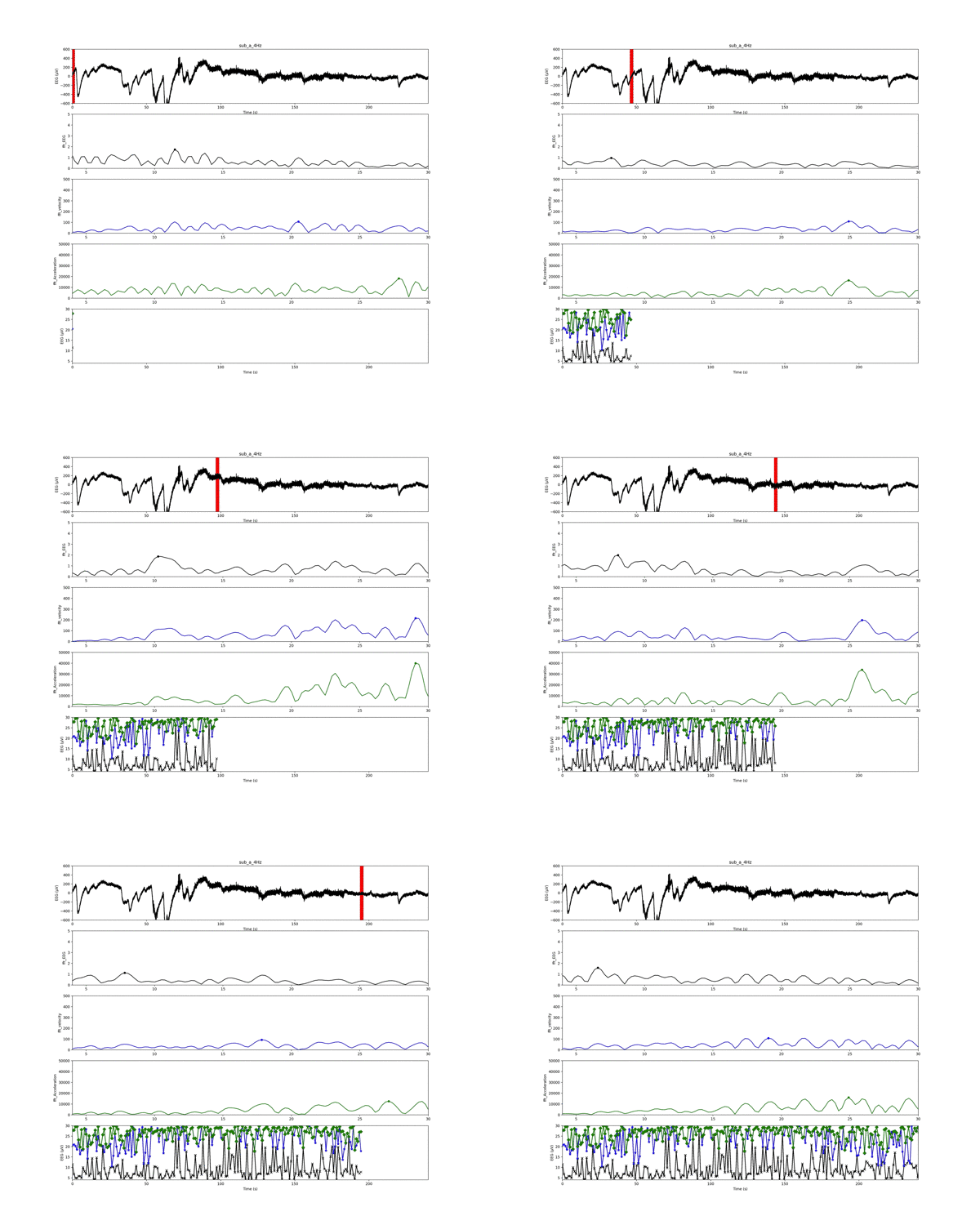
1番上の「実験値の生波形(脳波の電位)」の赤いスライドしている線が解析ウインドウです.
2〜4番目のグラフは解析ウインドウごとの周波数結果です!
現在は1秒ごとのデータで,4から30Hzのフィルタリングを施しています.
2番目のグラフが「電位の周波数」
3番目が「速度の周波数」
4番目が「加速度の周波数」
の結果です.
一番最後のグラフは,「電位」,「速度」,「加速度」の周波数結果のピークを解析窓ごとにプロットしたものになります.
加速度の周波数結果は,電位に比べて非常に大きくなるのですね!
しかし,周波数結果の概形はほとんど変わらないようです.
この記事はこんな人にオススメです. 「時間」周波数解析について知りたい人 時系列データの解析を行っている人 生…

Pythonプログラムについて
プログラムはPythonで記述しております.
以前質問があったので,ちょっと付け加えると,rowNっていうのは,解析するデータの列の指定になります.
ちなみに,速度と加速度は,電位の中心差分で算出してます.
また今度中心差分について詳しく記述します.
# -*- coding: utf-8 -*-
import csv
import scipy.signal as sps
from scipy.optimize import leastsq
import numpy as np
import matplotlib.pyplot as plt

import matplotlib.animation as animation
import matplotlib.patches as patches
from time import sleep
#frame = 241
frame = 241
#定数宣言
N = 512            # サンプル数
dt = 0.002          # サンプリング間隔
p_max = 30.0
p_min = 4
t_min = 0
t_max = 240
window = N*dt

n_b = 512
n_a = 1024

inputData = 'exp.txt'
outputMovie = 'result_a_4Hz.mp4'
#exp.txtの解析する列指定
rowN = 1
figTitle = 'sub_a_4Hz'

t = list()
x_exp = list()

def input_Data():
    with open(inputData, 'r') as InputFile:
        reader = csv.reader(InputFile, delimiter='\t')
        for row in reader:
            t.append(float(row[0]))
            x_exp.append(float(row[rowN]))

#中央差分
def CentralD(g):
    i = 1
    gdot = list()
    for i in range(len(g)-2):
        gdot.append(float((g[i+1]-g[i-1])/(2*dt)))
    return gdot

#2の累乗判定
def judge_pow2(x, x_m):
    nnn = len(x)
    if((nnn&(nnn-1))!=0):
        e_a = np.ceil(np.log2(nnn))
        n_add = int((2**e_a)-nnn)
        x = np.hstack((x, np.full(n_add, x_m)))
    return x

#x_exp_s...fftに送って、長さを2のべき乗に合わせてから、fftをしてバンドパスをしてifftしてifftをリターンする
#xdd_exp...fftに送って、第1ピークを探してwを取得してリターンする
#fft_peak検出用関数
def fft_peak(x, x_m):

    #分解能向上用パディング
    x = np.hstack((np.full(n_b, x_m), x, np.full(n_a, x_m)))
    len_x = len(x)

    peak_idx = list()
    # データのパラメータ
    freq = np.linspace(0, 1.0/dt, len_x) # 周波数軸
    print(freq)
    # 高速フーリエ変換
    F = np.fft.fft(x)

    Power = F.copy()
    # 振幅スペクトルを計算
    Power = np.abs(Power)
    # 振幅を元の信号のスケールに揃える
    Power = Power / ((len_x)/2) # 交流成分はデータ数で割って2倍する
    Power[0] = Power[0] / 2 # 直流成分
    # FFTデータからピークを自動検出
    peak_idx = sps.argrelmax(Power, order=3)[0] # 極大値の取得(orderでピークの最小間隔指定)
    # 閾値より小さい振幅ピークの除外 + 0.5~30Hzの帯域制限
    peak_cut = 0.2 # ピーク閾値
    peak_idx = peak_idx[(Power[peak_idx] > peak_cut) & (freq[peak_idx] >= p_min) & (freq[peak_idx] <= p_max)]

    selected_peakPower = zip(Power[peak_idx], freq[peak_idx])
    #パワー値の大きい順に並べ替え
    peak = sorted(selected_peakPower, reverse=True)
    p, f = zip(*peak)
    p = list(p)
    f =list(f)
    del f[1:]
    print(f)
    del p[1:]
#    print(p)
    return f, p, Power, freq


def main(TimeStep):
    global x_exp, t

    x_exp_s = x_exp[TimeStep*N:(TimeStep+1)*N]
    t_s = t[TimeStep*N:(TimeStep+1)*N]

    xd_exp = CentralD(x_exp_s)
    xdd_exp = CentralD(xd_exp)

    x_m = np.mean(x_exp_s)
    #fft用にデータ数を2のべき乗に揃える
#    x_exp_s = judge_pow2(x_exp_s, x_m)
    f_x, p_x, Power_x, freq_x = fft_peak(x_exp_s, x_m)

    xd_m = np.mean(xd_exp)
    xd_exp = np.hstack((np.full(1, xd_m), xd_exp, np.full(1, xd_m)))
#    xd_exp = judge_pow2(xd_exp, xd_m)
    f_xd, p_xd, Power_xd, freq_xd = fft_peak(xd_exp, xd_m)

    xdd_m = np.mean(xdd_exp)
    xdd_exp = np.hstack((np.full(2, xdd_m), xdd_exp, np.full(2, xdd_m)))
#    xdd_exp = judge_pow2(xdd_exp, xdd_m)
    f_xdd, p_xdd, Power_xdd, freq_xdd = fft_peak(xdd_exp, xdd_m)

    return  t_s, x_exp_s, Power_x, freq_x, f_x, p_x, xd_exp, Power_xd, freq_xd, f_xd, p_xd, xdd_exp, Power_xdd, freq_xdd, f_xdd, p_xdd


#グラフ用意
fig = plt.figure(figsize=(18,16))
ax1 = plt.subplot2grid((5,1), (0,0))
#ax2 = plt.subplot2grid((8,1), (1,0))
#ax3 = plt.subplot2grid((8,1), (2,0), sharex = ax2)
#ax4 = plt.subplot2grid((8,1), (3,0), sharex = ax2)
#ax5 = plt.subplot2grid((8,1), (4,0))
#ax6 = plt.subplot2grid((8,1), (5,0), sharex = ax5)
#ax7 = plt.subplot2grid((8,1), (6,0), sharex = ax5)
#ax8 = plt.subplot2grid((8,1), (7,0), sharex = ax1)
ax5 = plt.subplot2grid((5,1), (1,0))
ax6 = plt.subplot2grid((5,1), (2,0), sharex = ax5)
ax7 = plt.subplot2grid((5,1), (3,0), sharex = ax5)
ax8 = plt.subplot2grid((5,1), (4,0), sharex = ax1)

def update_fig1():
    global x_exp, t
    ax1.cla()
    ax1.set_title(figTitle)
    ax1.set_xlim(t_min, t_max)
    ax1.set_ylabel('EEG (μV)')
    ax1.set_ylim([-600,600])
    ax1.set_xlabel('Time (s)')
    ax1.plot(t, x_exp, 'k') #時間配列, 実験値配列, 色

input_Data()

def update_fig():
#    ax2.cla()
#    ax3.cla()
#    ax4.cla()
    ax5.cla()
    ax6.cla()
    ax7.cla()

#    ax2.set_ylabel('EEG')
#    ax2.set_ylim(-100, 100)
#    ax2.tick_params(length=2, axis='x',labelbottom='off')
#    ax3.set_ylabel('Velocity')
#    ax3.set_ylim(-2.5e4, 2.5e4)
#    ax3.tick_params(length=2, axis='x',labelbottom='off')
#    ax4.set_ylabel('Acceleration')
#    ax4.set_ylim(-1e7, 1e7)
#    ax4.tick_params(length=2, axis='x',labelbottom='off')

    ax5.set_ylabel('fft_EEG')
    ax5.set_ylim(0, 5)
    ax5.set_xlim(4, 30)
    ax6.set_ylabel('fft_velocity')
    ax6.set_ylim(0, 500)
    ax7.set_ylabel('fft_Acceleration')
    ax7.set_ylim(0, 50000)

def update_fig8():
    ax8.cla()
    ax8.set_xlim(t_min, t_max)
    ax8.set_ylabel('EEG (μV)')
    ax8.set_ylim([4,30])
    ax8.set_xlabel('Time (s)')

tm = list()
fr_x = list()
fr_xd = list()
fr_xdd = list()

def update(timestep):
    global tm, fr_x, fr_xd, fr_xdd

    t_s, x_exp_s, Power_x, freq_x, f_x, p_x, xd_exp, Power_xd, freq_xd, f_xd, p_xd, xdd_exp, Power_xdd, freq_xdd, f_xdd, p_xdd = main(timestep)


    #描画
    if timestep % frame == 0:
        update_fig8()
        tm = list()
        fr_x = list()
        fr_xd = list()
        fr_xdd = list()
        tm.append(float(timestep*window))
        fr_x.append(float(f_x[0]))
        fr_xd.append(float(f_xd[0]))
        fr_xdd.append(float(f_xdd[0]))
    else:
        tm.append(float(timestep*window))
        fr_x.append(float(f_x[0]))
        fr_xd.append(float(f_xd[0]))
        fr_xdd.append(float(f_xdd[0]))
    #グラフ1の初期化
    update_fig1()
    update_fig()
    #ウィンドウの表示
    r = patches.Rectangle(xy=((timestep-1/2)*window, -600.0), width=window*2, height=1200.0, ec='r', fc='r')
    ax1.add_patch(r)


#    ax2.plot(t_s, x_exp_s, 'k', marker="x", markersize=2)
#    ax3.plot(t_s, xd_exp, 'b', marker="x", markersize=2)
#    ax4.plot(t_s, xdd_exp, 'g', marker="x", markersize=2)
    ax5.plot(freq_x, Power_x, 'k')
    ax5.plot(f_x[0], p_x[0], 'k', marker="o", markersize=5)
    ax6.plot(freq_xd, Power_xd, 'b')
    ax6.plot(f_xd[0], p_xd[0], 'b', marker="o", markersize=5)
    ax7.plot(freq_xdd, Power_xdd, 'g')
    ax7.plot(f_xdd[0], p_xdd[0], 'g', marker="o", markersize=5)

    ax8.plot(tm, fr_x, 'k', marker="x")
#    ax8.plot(timestep*window, f_x[0], 'k', marker="x", markersize=2)
    ax8.plot(tm, fr_xd, 'b', marker="*")
#    ax8.plot(timestep*window, f_xd[0], 'b', marker="^", markersize=2)
    ax8.plot(tm, fr_xdd, 'g', marker="D")
#    ax8.plot(timestep*window, f_xdd[0], 'g', marker="D", markersize=2)

ani = animation.FuncAnimation(fig, update, interval=50, frames=frame)
#plt.show()
ani.save(outputMovie) #保存
コメントアウトを適宜外して,調節すると,速度と加速度も表示することができますよ!
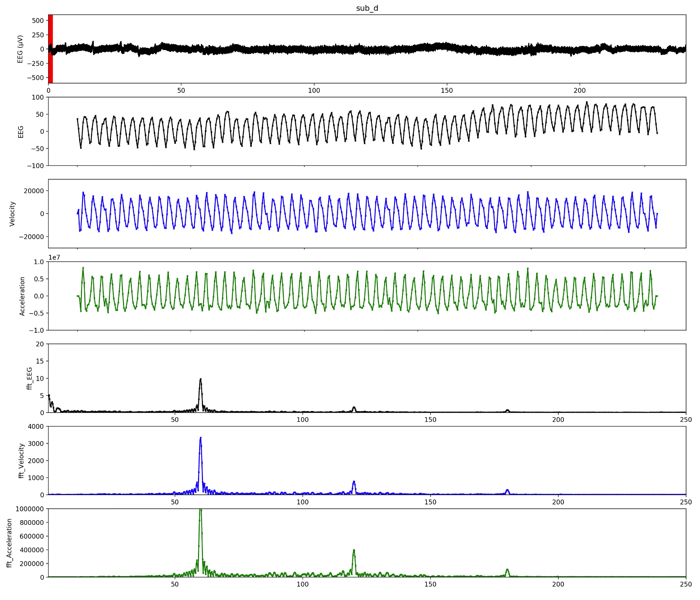
こんな感じです〜!
では,良い解析ライフをー!
プログラムの補足
2の累乗を判定する関数
上のコード中のこちらの関数について,
#2の累乗判定
def judge_pow2(x, x_m):
    nnn = len(x)
    if((nnn&(nnn-1))!=0):
        e_a = np.ceil(np.log2(nnn))
        n_add = int((2**e_a)-nnn)
        x = np.hstack((x, np.full(n_add, x_m)))
    return x
具体的な説明を以下で解説しましたので,是非ご覧ください.
この記事はこんな人にオススメです 2の累乗を判別するコードを書きたい人 その意味をしっかりと理解したい人 プロ…